Labels

Showing posts with label Usage Analysis. Show all posts

Friday, 12 February 2016

Using Siebel’s new Usage Pattern Tracking


Using Siebel’s new Usage Pattern Tracking (UPT).


With Siebel 15.5 came the new Usage Pattern Tracking; an improved way to get usage statistics out of Siebel.  Siebel has always had the ability (though little known) to provide usage statistics based on providing a time stamp for every view that a user visits.

We have been using this method for many years to provide in-depth analysis of user behaviour within Siebel.


With the new Usage Pattern Tracking we are now seeing additional events that can be tracked.  Before UPT we could only monitor view visits and had to extrapolate the Application, Business Component or Applet from that.  With UPT this has now been made a lot easier for us to get that information.

UPT will now also provide information on events associated with client scripts, for example Browser Scripts, JavaScripts and Server Scripts. This adds a lot of value to information that can be gathered.

So all in all UPT brings a lot of additional information that can be analysed, but what it doesn't do is perform the analysis.

I can see that the Usage Pattern Tracking view within Siebel may be of use if a specific view or script is being closely monitored - maybe there is a performance problem within a view or a script is causing issues - it's like a mini SARM.  But I can’t see that it would be of any use for one of our typical engagements that require us to analyse millions of records.


And that for me is the missing piece. After a quick Google it’s obvious that I wasn’t the only one hoping that UPT would provide the capability to analyse the data that has been captured – but sadly no – that task is still left to the Administrator.


Siebel Usage Analytics from CRMantra


As I mentioned earlier, we have been performing Siebel Usage Analytics for a long time now – and we always had, and still do, have the same ‘knee jerk’ reaction to our solution.  That it was very easy for the Siebel Administrator to turn on the usage service and do the analysis by themselves.  I agree with the first part, yes it’s very easy to turn on – but the second part? Absolutely not.  I’ve lost count of the number of Siebel Administrators who came back after a few weeks and asked for help to analyse the enormous amount of data that had been captured.

So whilst turning on the Usage logging and capturing the data is easy – actually analysing the data and turning it into actionable insights is no trivial task.

This is how we typically work on one of these engagements.

1 – Work with the business and the Siebel team to discover what is the key aim for this analysis.
For example; Is it to find our who is or is not using Siebel and overcome user adoption issues?  Is it to find out which parts of Siebel are heavily used – or never used?  Is it to find out what are the common paths users use to traverse the application and improve training?

2 – Turn on the Usage logging (that’s about a 10 minute job!)

3 – Work with the business to gather additional user demographic information.
What’s a user’s role, their skill level, their job title, their location, their business unit – everything we need to further enrich the data.

4 – We leave the logging to run for around 2-3 weeks and then get to work on the analysis.

5 – We merge in the user demographic profiles and start running through our standard set of analyses.

6 – We run any additional analyses that the client has asked for and pull together a full set of reports.

7 – We then look for actionable insights within the results.
Are there 8 heavily used Views that could do with some UI improvements? Are there a set of users in a remote locale that just aren’t using Siebel?  Is their a Siebel ‘SuperStar’ that is using Siebel more than anyone else – what can we learn from them?

8 – Finally we package up the analysis, generate the necessary graphics and charts and present our findings back to the client, with clear action statements that we gathered from the analysis.

Typically, projects would then be kicked off based on these findings – which aren’t always Siebel based, it could be new training material or a re-training programme.

But, most importantly is the need to re-analyse Siebel once any improvement measures have been put into place – without that there is no way of knowing if the actions that were taken had any effect!

So, hopefully it’s now clear that whilst turning on the Usage logging has to be done, it is only a very small part of the process.

Get in touch if you’d like to run one for your organisation!
read about some of our findings in this blog post > Siebel-usage-analytics

Or read more about all our Services - Improving Siebel Usability

David Moorman
David.moorman@crmantra.com


Thursday, 28 January 2016

Siebel Usage Analytics - Kick start your Siebel UX project

Siebel Usage Analytics - Kick start your Siebel UX project


I thought this week that I would share some of the shocking stats CRMantra have gathered during a number of our assignments.  They make for eye-opening reading...  Our customers are using these analyses as the groundwork for improving the Siebel User Experience (UX).

Without this kind of analysis most customers don't know where to start or where to focus and typically have to rely on 'gut instinct'.  With Siebel Usage Analytics from CRMantra they now have concrete evidence of the how Siebel is being utilised.

Below are some of the stat's we have produced...

Siebel Views accessed - We are typically seeing only about 10% of the available views being access during the course of the analysis (usually 3-4 weeks).  The one below is even lower at about 8% of views accessed.


Another client had 225 views accessed, with 44% visited less than 10 times in a month (That's for the whole user base of about 2000 users) - So that leaves 56% of the views - around 126 views, that could be said to be used 'Regularly'.


The Usage Profile below goes even further and highlights that if we can focus on the Top 20 or Top 50 views we have pretty well covered the majority of regularly used views.


And what do I mean when I say 'Focus' - well I mean fix, streamline, improve, update, consolidate.

So now there is a definitive list of those Top20 views, it is not an insurmountable task - and typically these only cover 3-4 Siebel Screens, usually Accounts, Service, Activities and Opportunity.

Think how powerful that Top20 list has now become.  It can be used to define the area's to focus effort and resource on.  It can be used to re-prioritise existing change requests. It can be used proactively to provide feedback to the business as to how their lives are going to be dramatically improved!

It can also give a good foundation for continual analysis of user adoption rates. Where to target training, which user group, which geo, which processes.

Oh and lets not forget upgrades - most of the time taken for the upgrade should be QA & UAT - ensuring that when you do go live your users are not impacted.  If you could focus on those top 50 views and ensure they are fully tested not only are you likely to have very little problems post go-live but you could bring that go live forward by weeks or months by not having to QA all the thousands of views that might have been affected.

Read more here about  UX - Our User Experience approach

David Moorman  


Wednesday, 3 December 2014

It’s Open Season on Open UI


It’s Open Season on Open UI


Siebel Open UI – Are you excited by the possibilities, but daunted by the challenges?
We can help.  CRMantra’s Open UI Assessment has increased the ROI from Open UI deployments for many Siebel customers. Here’s how.

·    Laser focus.  Why waste development time and resources on views no users visit. Siebel deployments use less than 5% of available views. CRMantra Open UI Assessment identifies which views your users visit.
·   Rolling Thunder.  Reduce the Open UI deployment risk through a phased roll out.  CRMantra Open UI Assessment will provide the breakdown of views visited by each subset of users.
·   Eyes Wide Open.  Know the technical issues and challenges before you start.  Open UI Assessment will analyze of your Siebel repository for technical issues and provide an estimate for resources required to address each technical issue.


Contact us to schedule your Open UI Assessment.    Results in weeks and at a fixed price.  Open UI Assessment does not require any software purchase or licensing followed by lengthy implementations. We stand behind the estimates to address the technical risks.  You will know upfront what it would cost to deploy Open UI if you use us!

The methodology for CRMantra’s Open UI Assessment has been validated and approved by Oracle – (See My Oracle Support - Doc 1626424.1).


Read more about our approach on our website Siebel Open UI


Tuesday, 4 June 2013

Open UI Opens Doors

Siebel Open UI – Making the Business Case


In the last few years, no functionality has excited the Siebel install base as much as the Siebel Open UI.  It has been a long wait to get here.  The Open UI has now been available in GA form in Siebel 8.1.1.9 for over 6 months.   We have had access to this functionality for almost a year and have spoken with a number of our customers who have expressed interest in it. 

Open UI opens doors
With Open UI, one can circumvent the closed system under SWE (Siebel Web Engine).  Users are now free of the yoke of Internet Explorer and Windows platform.  Developers can now invoke Siebel capabilities through alternate UI languages (Javascript, HTML/HTML5, Java, Flex, etc.).  One can design alternate UI paradigms without being constrained by the traditional Siebel Screen-view-applet format.

What’s the verdict so far – many presentations and conversations, no real action.  Customers haven’t yet taken the plunge and rolled it out to their users.  We sense a lot of hesitation and caution on part of customers.  Why?

Here are some of the challenges that we have seen:

What's the Difference – Looks like old Siebel. 
Looks are an issue.  Open UI based Siebel looks hardly any different from regular Siebel.  We have had to demo Open UI to customers using a Mac to highlight the difference!
 
Siebel Quotes in Open UI


While familiarity is very helpful in reducing the change management required in rolling out a new UI paradigm, this very factor is working against it.  Users are asking, so what’s new?

Given the breadth and diversity of Siebel install base, Oracle has the unenviable challenge of creating new UI designs and flows with the “difference” users are looking for.  Perhaps, the current approach of releasing the Open UI as a toolkit and letting customers exercise their imagination is the most pragmatic solution.

What Users Want. 
Our interactions with customers on this subject have led us to ask, so why was everyone waiting so expectantly for this functionality? We discovered that users were really yearning for a fix to the usability and user adoption issues with the Siebel application.  Replicating the old Siebel UI using the latest technology does not address the underlying usability issues.


So Many Views, Where Do We Start? 
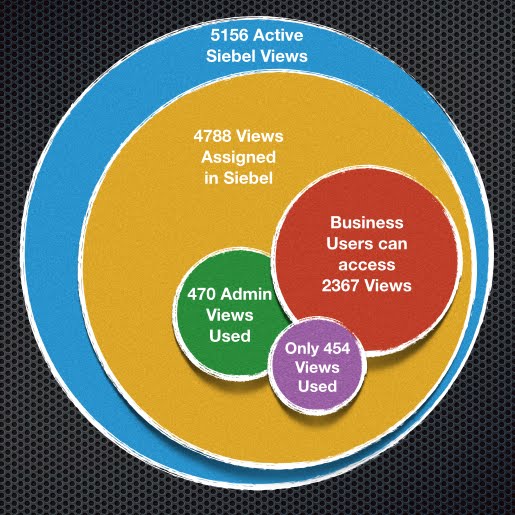
If merely exposing the Open UI and letting the users loose on it is not enough to address usability, then what is?  Does it make sense to redesign and rebuilt the views now that Open UI toolkit provides one with that freedom?  Based on the work we have done in Siebel Usage Analyses with customers (see this blog entry - our our website) , this is a monumental task.  There are well over 5000 views available in Siebel!  This could be a never-ending project with questionable ROI. 

Making the Business Case – The 5 Point Plan
  1. Know your Customer (i.e., the User)
  2. Start Small, Think Big
  3. Its about Flows, Not Fancy Forms and Views
  4. Estimate the Cost of Pain and Benefits of Gain
  5. Staff with Right Skills


Read more about CADD and our approach to Open UI Projects.

Your questions and comments are very welcome

david.moorman@crmantra.com


Monday, 15 October 2012

Siebel CRM - Open UI Post OOW Update

Well I promised I would report back after Oracle Openworld and here I am.

It has to be said that Siebel OpenUI was received with great applause (litterally!) at OOW.  It has to be the only session I've ever attended that had people applauding !!

So what was all the excitement about?  Well, for most it was the removal of the dependency on Internet Explorer for High Interactivity (HI) Mode.   This will make it accessible across browsers and devices and now finally on my Mac - (That will be my test number 1)!

After speaking to a number of Siebel customers, what comes next is the ability to switch on OpenUI and quickly provide a 'fresh' UI to the end user - though I would suggest it's not something you would do at 9am on a Monday morning to give your end-users a nice surprise to start their week!  It may be easier on the eye, but its not going to be life-changing...yet.

I see the OpenUI Framework more as a tool to make some dramatic changes to the way you can develop the UI that will have a major effect on how users interact with Siebel.

- Improving process flows
- removing clutter
- consolidating views
- CSS based views can be easily branded for customer/partner sites.

Though, what it also gives is carte-blanche for endless development cycles to get the colours right, the logo in the right place, the text in Helvetica 12, and probably the most dangerous...UI scripting !

Yep, so this now means that no need to write a new business rule in Siebel, update the srf and server - no, we can just write a bit of script put it in the HTML page and hey presto new business rule is in production!  That is going to be sooooooo tempting, and it is going to have to be resisted at all cost !


More OOW Info..


  • It's still planned to be in IP 2012, which my sources are telling me is likely to be December (Oh the problems of giving a release the name of a year!) 
  • Existing Task UI will work without changes, the SWE engine will render it correctly.
  • Siebel Configurator runs, without changes based on the existing product model meta data. - BUT a developer will not yet be able to change this UI through the same means (i.e HTML/CSS)


Siebel Open UI for Configurator (Screenshot above)
  • Siebel Order Management - Edit Promotions View - Hasn't been included.
  • The standard Open UI is not linked to a Licence, but OpenUI for Mobile will have a licence and fee attached. No details yet as to the cost/metrics, though credit will be give for customers with existing Siebel 'Mobile' licences.
  • OpenUI and HI UI can't run in the same OM. Maybe not a big issue but if there are non-standard UI templates that OpenUI may not be able to render then those will not be accessible to the user.
  • Any non-standard UI templates will need to be cleaned up, with the removal of 'structual' information as the server is no longer dictating the UI - This is now set by HTML/CSS.  That mean's replacing all "table' definitions with DIV elements.

Open UI for Mobile
  • Available sometime in 2013 and Version1 will only be available in connected mode
  • Comes with new web templates for a native app look and feel.
  • Built using ADF Mobile Framework
  • Task Based UI will also work, but no mobile templates provided OOTB for this.
  • It is Safari browser based, not a native app.
  • It will use another, new Object Manager (/salesm_enu iirc)
  • Views will be in Siebel tools, but it not clear yet how a developer would make use of the native functions and gestures.
  • And probably most important It's going to be a new licensable product from Oracle.


So where do Siebel customers go from here?   I've said it before in a previous post, but improving usability isn't just about a new veneer on top of Siebel - Careful consideration is needed to ensure the experience is a positive one for the end-user.   And every time I would recommend a Siebel Usage Analysis   to kick off any UI/UX project.

Get in touch if you have any further questions/comments/queries.
David

david.moorman@crmantra.com  www.crmantra.com


Friday, 28 September 2012

Oracle OpenWorld Preview Video

For those of you going to Oracle OpenWorld next week, thought I would post this 7min video from a couple of Analysts, Denis Pombriant and Brent Leary - and what they see as the focus for OOW 2012.

This is from CRMSoftware.tv and in the video, Denis and Brent discuss their predictions for the conference:
  • A focus on customer experience;
  • The importance of getting customers to transition to the Oracle Fusion Application; and
  • How Oracle will begin to piece together their newer acquisitions.
I have agree regarding CX, I've now been to a few Oracle presentations in the lead up to OOW, and CX (Though I would argue that UX is a more 'all encompassing' term) is the name of the game.. Should be interesting to see how they weave that message into the sessions !

Anyway enjoy the show..


Thursday, 27 September 2012

Siebel Open UI at OOW 2012

Just thought I would quickly list the two key sessions for Siebel Open UI at next weeks OOW.

These are going to be packed I'm sure, so make sure you have registered !
Hopefully there will be final confirmation of what's in / what's not and when we can get our hands on it !

I'll be the one asking all the questions listed in my previous post !

CON9705 - Unleash the Power of “Open UI”
Attend this panel discussion to learn how you can extend and unleash
the power of Oracle’s new “Open UI” Siebel interface, which focuses on customer experience.

CON9703 - User Interface Innovations with the New Siebel “Open UI”
This session provides an update on the new Siebel “Open UI” initiative that supports multiple
browsers and devices. It also presents an overview of the product deliverables.

If you've browsed the catalog and found others relevant please post a comment
Thanks
David

david.moorman@crmantra.com  www.crmantra.com

Thursday, 20 September 2012

Siebel Open UI - Update

So, we've just got back from the Oracle training event for Siebel Open UI.  There are definitely a number of rumours that can be quashed !


First a nice big screenshot to give you some idea of how Open UI is rendering the Siebel Views OOTB.


So what have we heard ?
  • RUMOUR: It will be available for all of Siebel.
  • FACT: It will only be available for Sales and Service - No full details of what that exactly covers, but it's by no means all of Siebel.  We can then assume it doesn't cover Siebel Order Management, Agreements and other more obscure areas of Siebel (Including all the admin views)   UPDATE! : Oracle have confirmed that Siebel Order Management is included- see a new screen shot below
Siebel Open UI - Siebel Order Management on Chrome Browser


  • RUMOUR: It will be release at OOW 2012
  • FACT: It will be available with Siebel 8.1.1.9 and the 2012 IP (Innovation Pack) but that is now looking to be GA in Jan 2013.
  • RUMOUR: There will be a price tag attached to Open  UI
  • FACT: There is no licence fee associated with Open UI, but obviously Oracle is looking to use this as a stimulus for additional user licences and extending the Siebel footprint into new areas and new channels.
  • There will be Native Mobile apps, but these are looking to be more involved to produce and deploy.
  • RUMOUR: Open UI will be a seperate set of views in Siebel Tools
  • FACT: The Open UI views will be rendered by the SWE engine at runtime, converting the views in Siebel Tools repository into HTML views for displaying through any browser.
  • RUMOUR: Deployment will be long and complex!
  • FACT: Deployment will be simple.. 
    • Create a new Object Manager (OM) 
    • Set the Open UI flag on the new OM
    • Create a new URL to point to the new OM
    • Login in and you're ready to rock... 
      • I personally can't wait to have it running on my MacBook... oh but I need Quotes and Orders so there goes that idea..


Some other things we need to have confirmed include;
  • How does it handle a process where some UI may not be in Open UI - for example a process that goes from Sales Opportunity to Quote or Order.
  • How will it handle Siebel browser script in either the browser version or on a Native Mobile App
  • What happens with customised views ? - Will they need to be tested or is there high confidence that these will work as before ?
  • Now that it will be available across platforms, across browsers how will that complexity of options be tested and supported - as there is an almost constant stream of browsers upgrades.
  • How can new and enhanced HTML views be developed and deployed ?

Siebel Open UI now adds a lot of potential, to both improved Siebel  usability within an Organisation - as well as for unscrupulous SI's to start pushing the customer into unnecessary and cost UI Upgrade projects - so beware!   There's nothing that extends a UI design project more than teams disagreeing on the shade of blue/red/green to be used !!

At CRMantra we still firmly believe it should be seen as an additional weapon in the UX arsenal, but an upgrade to Open UI without careful consideration of the costs and benefits is likely to bring little advantage to the business.

We recommend a Fact-Based determination of the scope of any CX/UX project and implementing Open UI is no different. For that we routinely use our Siebel Usage Analysis - see this blog for more details  - Siebel Usage Analysis


And as with all CX/UX projects and probably more importantly for Siebel Open UI, you need to ensure that the resulting UI is not just a set of views slapped together in a newer technology!  You need to pay close attention to the business process and clickstreams on the UI and drive process design based on facts instead of conjectures.  The Siebel Usage Analyses will provide this critical information.

We still have more questions than answers, so I'll try to update this as we hear back from Oracle on the items I've mentioned.

NEW: Post OOW update here http://crmux.blogspot.co.uk/2012/10/siebel-crm-open-ui-post-oow-update.html


As always if you have any questions or comments please get in touch.
david.moorman@crmantra.com  www.crmantra.com


Wednesday, 5 September 2012

Have CRM? Go Mobile!

The growing popularity of mobile devices, smartphones and tablets has increased the pressures on companies to equip their sales teams with mobile capabilities. Here at CRMantra we've had numerous customers asking us for an OOTB mobile solution for Siebel.  This ranges from a Telco wanting to have handheld Samsung Galaxy's in their stores to act as a 'Queue Busting' PoS, to banks, media and manufacturing companies wanting to have key sales functions on an iPad.

Key requirements were; minimal (if possible, zero) impact on the current CRM implementation.  Easy to administer and deploy, and above all else ease of use for the Sales Rep or Sales Assistant.

We have searched with them to find something suitable, and whilst there are mobile apps out there that do these things, none of them are integrated with Siebel, or even designed with the complexities of Siebel in mind.  So that only gave us one option - to build it ourselves.

We had the perfect starting position, the integration groundwork was already done thanks to InterAct Xchange and we have now developed mobile solutions for SFA and eCommerce that we are proud of.. oh and most importantly one that meets our customers needs !


In each case, upon further investigation, we uncovered that there are many different flavors of "mobile offering" companies want to deploy. Each type of mobile solution has its pros and cons.  Here are some things to consider for the various options based upon the studies we have undertaken.


Option
Pros
Cons
Results
OPTION 1 – Siebel UI via VPN
Fast Deployment / Lower cost Option
User experience is not good enough.  Performance is slow because of vagaries of the network connection.  In addition, Siebel web user interface does not lend itself with touch with fat fingers on a mobile screen.  
Many IT organizations go this route to check off the requirement, only to find a scores of disappointed users and poor adoption.  In the end, they need to select Option 2 or Option 3.

OPTION 2: Browser-based connected mobile application

Lower cost option.  Features a web page formatted for the mobile device and enabled with controls for the touch interface. This option would be appropriate to deploy for customer-facing applications.  It offers the advantage of no locally stored data to alleviate any security concerns, especially in customer-facing uses. 

Performance is still a function of the quality of network connection.  Slow or variable performance due to network connections could be a significant deterrent to user adoption, especially when deployed for employee access over VPN.  Need to build high-performance, mobile-optimized integrations to the backend applications and services such as CRM, ERP, Business Intelligence, etc., and possibly services such as credit check, payment authorizations, tax calculations, shipping cost calculators, address verifications, etc.

Appropriate for deployment in many customer-facing scenarios.  Tread carefully when deploying a mobile app with this option for employee-facing use.


OPTION 3: Native Disconnected Mobile application

The best user experience in terms of performance and usability.  Allows for seamless mash up of capabilities of the device apps (maps, GPS, camera, etc.), other enterprise apps (BI, ERP, CRM) and social apps such as LinkedIn, Facebook, Twitter, etc.

More expensive to build than the other two options.  Need to build high-performance, mobile-optimized integrations to various applications. 

Best performance and user experience.  More costly to implement.


Contact us if you would like to get some advice on your mobile initiatives - We believe we will have a solution that fits your needs!