Labels

Showing posts with label CRMantra. Show all posts

Thursday, 28 January 2016

Siebel Usage Analytics - Kick start your Siebel UX project

Siebel Usage Analytics - Kick start your Siebel UX project


I thought this week that I would share some of the shocking stats CRMantra have gathered during a number of our assignments.  They make for eye-opening reading...  Our customers are using these analyses as the groundwork for improving the Siebel User Experience (UX).

Without this kind of analysis most customers don't know where to start or where to focus and typically have to rely on 'gut instinct'.  With Siebel Usage Analytics from CRMantra they now have concrete evidence of the how Siebel is being utilised.

Below are some of the stat's we have produced...

Siebel Views accessed - We are typically seeing only about 10% of the available views being access during the course of the analysis (usually 3-4 weeks).  The one below is even lower at about 8% of views accessed.
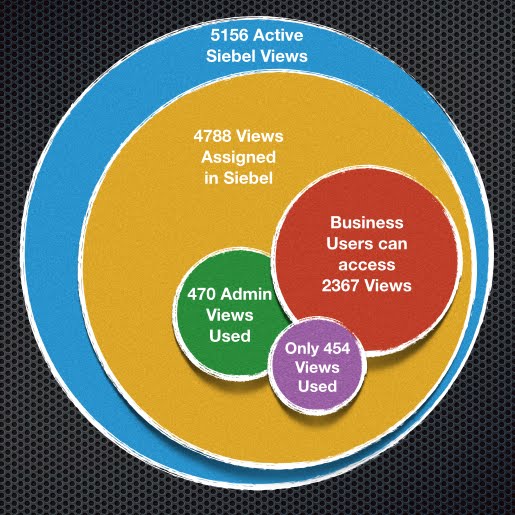


Another client had 225 views accessed, with 44% visited less than 10 times in a month (That's for the whole user base of about 2000 users) - So that leaves 56% of the views - around 126 views, that could be said to be used 'Regularly'.


The Usage Profile below goes even further and highlights that if we can focus on the Top 20 or Top 50 views we have pretty well covered the majority of regularly used views.


And what do I mean when I say 'Focus' - well I mean fix, streamline, improve, update, consolidate.

So now there is a definitive list of those Top20 views, it is not an insurmountable task - and typically these only cover 3-4 Siebel Screens, usually Accounts, Service, Activities and Opportunity.

Think how powerful that Top20 list has now become.  It can be used to define the area's to focus effort and resource on.  It can be used to re-prioritise existing change requests. It can be used proactively to provide feedback to the business as to how their lives are going to be dramatically improved!

It can also give a good foundation for continual analysis of user adoption rates. Where to target training, which user group, which geo, which processes.

Oh and lets not forget upgrades - most of the time taken for the upgrade should be QA & UAT - ensuring that when you do go live your users are not impacted.  If you could focus on those top 50 views and ensure they are fully tested not only are you likely to have very little problems post go-live but you could bring that go live forward by weeks or months by not having to QA all the thousands of views that might have been affected.

Read more here about  UX - Our User Experience approach

David Moorman  


Wednesday, 27 January 2016

Mobile Apps - What’s the cost of free ?


Mobile Apps - What’s the cost of free ?


At some point everyone has to compete with ‘free’.  I’ve recently come up against this and it is surprising how many customers hear the word ‘free’ and forget to check out the small print and all the repercussions.


So what makes the customer believe they have an option that is ‘free’?  I’ve listed a few possible scenarios.

1 – “The licences are free” 


This turns out to be a total misunderstanding, in fact the licences are far from free, but what they do have are existing licences that would cover this application, but there is still annual support and maintenance to be paid, and at a typical 18-22% this is no small amount.
There is also the dreaded small print – what exactly are you signing up to?  How long is it ‘free’ for?  What happens after Year1 – are you locked in regardless of any increase in costs?  This could be an expensive mistake.


2 – “We plan to take the application and deploy it as is, so there are no project costs” – 

This is a sure fire way to have the project fail, and potentially bring the company to its knee’s as key sales and support users are unable to use the new application.
            Additional costs come from all directions

(a)   Technical and functional consultants to correctly implement and extend the OOTB solution
(b)   Infrastructure and security architects to design a deployable mobile solution
(c)   Re-writing and developing new training material
(d)   Rolling out user training
(e)   New hardware and MDM system for the mobile solutions
(f)   Training for Operations and Support to allow them to deploy and support the new application.
(g)   Deploying and supporting the new application, hardware and MDM systems


3 – “The free solution isn’t perfect, but its ‘good enough’”.  


We have been recently deploying a number of Mobile Sales solutions and its pretty obvious that in this area ‘good enough’ rarely cuts it with the end user.  The User Adoption rates for mobile solution needs to be almost vertical, otherwise the device is put on a shelf and forgotten about, and it’s then almost impossible to re-invigorate the user base, leaving IT to support costly legacy solutions, as well as the new applications.

A few key things on user adoption come to mind for a mobile solution

(a)   Usability – It has to be current, visually appealing and easy to use.  In sales for example we are seeing sales reps, sitting with their customer using the mobile solution to take them through the product catalog, the quote, the configuration – this is no longer an internal facing application.
(b)   Process centric – It needs to be easy and intuitive to do the tasks that the user has to do day in, day out.
(c)   One for all – It needs to be one app that covers all the aspects of the users job, and that typically involves access to information from a multitude of back-end systems.
(d)   It has to be a ‘useful’ tool – not just a way for management to track the number of calls made or meetings organised. Intelligent analytics are a key way to feedback to the user as to where to spend their time to be most productive.

So let me quickly recap on those potential costs


·      Licence fees
·      Maintenance fees
·      Implementation costs
·      Training costs
·      Deployment costs
·      Support costs
·      Cost of potential future tie-ins
·      Cost of failure – due to poor user adoption


So, as you can see a free licence fee is far from it when the total project is scoped out, and it’s typically only a small part of the whole project. 


Get in touch:

Monday, 21 December 2015

Friday, 6 November 2015

Are you getting the most out of Siebel Open UI ?

Are you getting the most out of Siebel Open UI ?


Sure, you can upgrade to Siebel Open UI, activate it and let your users pick their browser of choice to access Siebel (and for some clients this in itself is one major roadblock that has been successfully removed!)…but now that you have Open UI, take a moment to think about what else it can do and the benefits it can bring.

By utilising the Siebel Open UI infrastructure we have been able to make huge improvements to the User Experience for Internal users, Channel Partners and Self-Service Consumers alike.

Since we first got our hands on Siebel OpenUI in 2012, we have been finding new and inventive ways to help customers dramatically improve their Siebel deployments.  If you’d like to know more about our unique approach to a Siebel Open UI project take a look here at CADD

With the release of Siebel Open UI we took the opportunity to fill the gap that had always existed in Siebel – namely a process-centric user experience.  We have always found the lack of processes to be the #1 reason behind poor usability of Siebel.

By defining and ‘baking in’ these processes we have seen major improvements in,
·      User Adoption
·      Reduced training needs
·      Increased productivity
·      And user happiness !!

As well as
·      Total Cost of Ownership reduced as old technology (ActiveX) is removed and alternative browsers deployed.
·      Lower development costs by using industry standard JavaScript libraries to rapidly develop new functionality, as well as HTML5 and CSS – Skills that are readily available in the market.
·      Easily use the new UI across browsers and devices (Mac, Windows, Android, Linux, iOS)

To help us fast track these projects we have built a library of Processes and Templates that are ready to be used, adapted and deployed – there is now no need to start from a blank page !!

We have seen how consolidating the right information on one page can have a major positive impact on productivity – no more jumping around Siebel to find that important piece of information.  Fewer clicks, means less time wasted, means a more productive user !


InterACT Dynamic Screen Framework (DSF)


With InterACT DSF we have taken Siebel Open UI and made it even better.  One common request we had from our clients was to be able to have a finer level of control over the UI, to allow them to dramatically reduce field ‘clutter’ and improve usability.

We took on that challenge and designed InterACT Dynamic Screen Framework.  It allows rules to be defined that determine which fields and applets are shown to which users or user-groups.  It means that one common, “global” page can be created and fields managed by exception, without the need to create dozens of slightly different pages that have to be maintained individually and assigned to different users.

Other typical issues and our solutions are :-  


UI Issue
Our Open UI Improvements
Hard to find important info
Information displayed on hover-over
Excessive Scrolling
Expand views on click and mouse wheel scrolling
Only common views, but diverse users
InterACT Dynamic Screen Framework
Complex flows with no process
Process-based UI (For Example InterACT CPQ)
No 360° view
Dynamic 360° views


Now is the perfect time to grasp the UX bull by the horns and start to make some huge improvements for your users – you have the tools !

Take a look out our website for more info - Siebel Open UI

If you want to know more get in touch,
david.moorman@crmantra.com