Labels

Friday, 12 February 2016

Using Siebel’s new Usage Pattern Tracking


Using Siebel’s new Usage Pattern Tracking (UPT).


With Siebel 15.5 came the new Usage Pattern Tracking; an improved way to get usage statistics out of Siebel.  Siebel has always had the ability (though little known) to provide usage statistics based on providing a time stamp for every view that a user visits.

We have been using this method for many years to provide in-depth analysis of user behaviour within Siebel.


With the new Usage Pattern Tracking we are now seeing additional events that can be tracked.  Before UPT we could only monitor view visits and had to extrapolate the Application, Business Component or Applet from that.  With UPT this has now been made a lot easier for us to get that information.

UPT will now also provide information on events associated with client scripts, for example Browser Scripts, JavaScripts and Server Scripts. This adds a lot of value to information that can be gathered.

So all in all UPT brings a lot of additional information that can be analysed, but what it doesn't do is perform the analysis.

I can see that the Usage Pattern Tracking view within Siebel may be of use if a specific view or script is being closely monitored - maybe there is a performance problem within a view or a script is causing issues - it's like a mini SARM.  But I can’t see that it would be of any use for one of our typical engagements that require us to analyse millions of records.


And that for me is the missing piece. After a quick Google it’s obvious that I wasn’t the only one hoping that UPT would provide the capability to analyse the data that has been captured – but sadly no – that task is still left to the Administrator.


Siebel Usage Analytics from CRMantra


As I mentioned earlier, we have been performing Siebel Usage Analytics for a long time now – and we always had, and still do, have the same ‘knee jerk’ reaction to our solution.  That it was very easy for the Siebel Administrator to turn on the usage service and do the analysis by themselves.  I agree with the first part, yes it’s very easy to turn on – but the second part? Absolutely not.  I’ve lost count of the number of Siebel Administrators who came back after a few weeks and asked for help to analyse the enormous amount of data that had been captured.

So whilst turning on the Usage logging and capturing the data is easy – actually analysing the data and turning it into actionable insights is no trivial task.

This is how we typically work on one of these engagements.

1 – Work with the business and the Siebel team to discover what is the key aim for this analysis.
For example; Is it to find our who is or is not using Siebel and overcome user adoption issues?  Is it to find out which parts of Siebel are heavily used – or never used?  Is it to find out what are the common paths users use to traverse the application and improve training?

2 – Turn on the Usage logging (that’s about a 10 minute job!)

3 – Work with the business to gather additional user demographic information.
What’s a user’s role, their skill level, their job title, their location, their business unit – everything we need to further enrich the data.

4 – We leave the logging to run for around 2-3 weeks and then get to work on the analysis.

5 – We merge in the user demographic profiles and start running through our standard set of analyses.

6 – We run any additional analyses that the client has asked for and pull together a full set of reports.

7 – We then look for actionable insights within the results.
Are there 8 heavily used Views that could do with some UI improvements? Are there a set of users in a remote locale that just aren’t using Siebel?  Is their a Siebel ‘SuperStar’ that is using Siebel more than anyone else – what can we learn from them?

8 – Finally we package up the analysis, generate the necessary graphics and charts and present our findings back to the client, with clear action statements that we gathered from the analysis.

Typically, projects would then be kicked off based on these findings – which aren’t always Siebel based, it could be new training material or a re-training programme.

But, most importantly is the need to re-analyse Siebel once any improvement measures have been put into place – without that there is no way of knowing if the actions that were taken had any effect!

So, hopefully it’s now clear that whilst turning on the Usage logging has to be done, it is only a very small part of the process.

Get in touch if you’d like to run one for your organisation!
read about some of our findings in this blog post > Siebel-usage-analytics

Or read more about all our Services - Improving Siebel Usability

David Moorman
David.moorman@crmantra.com


Thursday, 28 January 2016

Siebel Usage Analytics - Kick start your Siebel UX project

Siebel Usage Analytics - Kick start your Siebel UX project


I thought this week that I would share some of the shocking stats CRMantra have gathered during a number of our assignments.  They make for eye-opening reading...  Our customers are using these analyses as the groundwork for improving the Siebel User Experience (UX).

Without this kind of analysis most customers don't know where to start or where to focus and typically have to rely on 'gut instinct'.  With Siebel Usage Analytics from CRMantra they now have concrete evidence of the how Siebel is being utilised.

Below are some of the stat's we have produced...

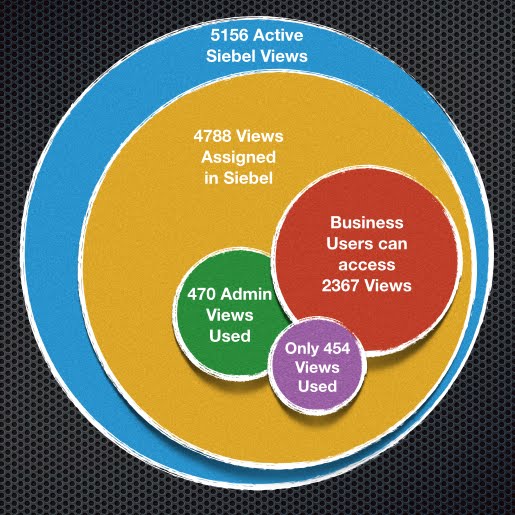
Siebel Views accessed - We are typically seeing only about 10% of the available views being access during the course of the analysis (usually 3-4 weeks).  The one below is even lower at about 8% of views accessed.


Another client had 225 views accessed, with 44% visited less than 10 times in a month (That's for the whole user base of about 2000 users) - So that leaves 56% of the views - around 126 views, that could be said to be used 'Regularly'.


The Usage Profile below goes even further and highlights that if we can focus on the Top 20 or Top 50 views we have pretty well covered the majority of regularly used views.


And what do I mean when I say 'Focus' - well I mean fix, streamline, improve, update, consolidate.

So now there is a definitive list of those Top20 views, it is not an insurmountable task - and typically these only cover 3-4 Siebel Screens, usually Accounts, Service, Activities and Opportunity.

Think how powerful that Top20 list has now become.  It can be used to define the area's to focus effort and resource on.  It can be used to re-prioritise existing change requests. It can be used proactively to provide feedback to the business as to how their lives are going to be dramatically improved!

It can also give a good foundation for continual analysis of user adoption rates. Where to target training, which user group, which geo, which processes.

Oh and lets not forget upgrades - most of the time taken for the upgrade should be QA & UAT - ensuring that when you do go live your users are not impacted.  If you could focus on those top 50 views and ensure they are fully tested not only are you likely to have very little problems post go-live but you could bring that go live forward by weeks or months by not having to QA all the thousands of views that might have been affected.

Read more here about  UX - Our User Experience approach

David Moorman  


Wednesday, 27 January 2016

Mobile Apps - What’s the cost of free ?


Mobile Apps - What’s the cost of free ?


At some point everyone has to compete with ‘free’.  I’ve recently come up against this and it is surprising how many customers hear the word ‘free’ and forget to check out the small print and all the repercussions.


So what makes the customer believe they have an option that is ‘free’?  I’ve listed a few possible scenarios.

1 – “The licences are free” 


This turns out to be a total misunderstanding, in fact the licences are far from free, but what they do have are existing licences that would cover this application, but there is still annual support and maintenance to be paid, and at a typical 18-22% this is no small amount.
There is also the dreaded small print – what exactly are you signing up to?  How long is it ‘free’ for?  What happens after Year1 – are you locked in regardless of any increase in costs?  This could be an expensive mistake.


2 – “We plan to take the application and deploy it as is, so there are no project costs” – 

This is a sure fire way to have the project fail, and potentially bring the company to its knee’s as key sales and support users are unable to use the new application.
            Additional costs come from all directions

(a)   Technical and functional consultants to correctly implement and extend the OOTB solution
(b)   Infrastructure and security architects to design a deployable mobile solution
(c)   Re-writing and developing new training material
(d)   Rolling out user training
(e)   New hardware and MDM system for the mobile solutions
(f)   Training for Operations and Support to allow them to deploy and support the new application.
(g)   Deploying and supporting the new application, hardware and MDM systems


3 – “The free solution isn’t perfect, but its ‘good enough’”.  


We have been recently deploying a number of Mobile Sales solutions and its pretty obvious that in this area ‘good enough’ rarely cuts it with the end user.  The User Adoption rates for mobile solution needs to be almost vertical, otherwise the device is put on a shelf and forgotten about, and it’s then almost impossible to re-invigorate the user base, leaving IT to support costly legacy solutions, as well as the new applications.

A few key things on user adoption come to mind for a mobile solution

(a)   Usability – It has to be current, visually appealing and easy to use.  In sales for example we are seeing sales reps, sitting with their customer using the mobile solution to take them through the product catalog, the quote, the configuration – this is no longer an internal facing application.
(b)   Process centric – It needs to be easy and intuitive to do the tasks that the user has to do day in, day out.
(c)   One for all – It needs to be one app that covers all the aspects of the users job, and that typically involves access to information from a multitude of back-end systems.
(d)   It has to be a ‘useful’ tool – not just a way for management to track the number of calls made or meetings organised. Intelligent analytics are a key way to feedback to the user as to where to spend their time to be most productive.

So let me quickly recap on those potential costs


·      Licence fees
·      Maintenance fees
·      Implementation costs
·      Training costs
·      Deployment costs
·      Support costs
·      Cost of potential future tie-ins
·      Cost of failure – due to poor user adoption


So, as you can see a free licence fee is far from it when the total project is scoped out, and it’s typically only a small part of the whole project. 


Get in touch: